If you play poker on a Mac and want a solver, here is the short answer. Yes, PioSolver works on a Mac. You run Windows inside macOS with a program called Parallels, then install PioSolver on that. It works, but it costs a lot more than the solver alone. You also give a big share of your Mac's memory to Windows, and you look after two operating systems just to study a flop.
There is now a simpler way. Flopnado is a GTO solver that runs on the Mac itself, on Apple chip and Intel Macs, for one payment of €20. It uses less memory than other solvers and gives the same results. Below is every option side by side, then what running PioSolver on a Mac really involves, and what Flopnado does instead.
Every GTO solver for Mac, compared
Here is every option side by side. Where no reliable source says yes or no, the table says "Not stated".
| Solver | On a Mac | Price | Payment | Aggregate solving | Node locking | Turn and river reports | Trainer | Short deck | HUD and calculators included |
|---|---|---|---|---|---|---|---|---|---|
| Flopnado | Native app, Apple chip and Intel | €20 | Once | Yes | Yes, per hand or whole spot | Yes | Yes, on your own solves | Yes, both rule sets | Yes (HUD free forever) |
| PioSolver Pro | Through Parallels (Boot Camp on Intel only) | €450 (Edge €800) | Once, 1 year of updates | Yes | Yes | Yes | Yes | Not stated | No |
| GTO+ | Windows only, needs Parallels | $75 | Once, all updates | Yes (since 2017) | Yes ("Lock decision") | Yes | Not stated | Separate product | No |
| Simple Postflop | Not native, runs through Parallels | $299 standalone | Once | Not stated | Yes (strategy editing and locking) | Not stated | Not stated | Not stated | No |
| Postflopizer | Download page says Windows and Mac; shop lists Windows only | $20 to $60 a month, or $150 to $450 a year | Subscription (one-off at launch in 2023) | Not mentioned | Yes | Yes (runout analysis) | Promised in 2024, not confirmed | Not mentioned | No |
| MonkerSolver | Runs on Mac (Java) | €499 | Once | Not stated | Not stated | Not stated | Not stated | Not stated | No |
| GTO Wizard | In the browser | $39 to $279 a month | Subscription | Elite plan only, paid with credits | Higher plans | Not stated | Yes | Not stated | No |
| GTO Gecko | Mac app | From $24.99 a month | Subscription | Not stated | Not stated | Not stated | Yes | Not stated | No |
| TexasSolver | Yes | Free | Open source | Not stated | Not stated | Not stated | No | Yes | No |
| Desktop Postflop | Must build it yourself on Mac | Free | Open source | No (never finished) | No (never finished) | Not stated | No (never finished) | No | No |
Running PioSolver on a Mac with Parallels
PioSolver is a Windows program, and its makers are open about that. Their technical page says: "PioSOLVER is a Windows desktop application. Mac works. Our customers run the solver using Parallels or Bootcamp." Their hardware FAQ says the same thing another way. On a Mac, you need some way to run Windows.
Boot Camp was Apple's own way to install Windows next to macOS, so you could restart the Mac into Windows. It only exists on older Intel Macs. If your Mac has an Apple chip, which means an M1, M2, M3 or anything newer, there is no Boot Camp. Parallels, or a program like it, is the only way.
That changes the bill. You are paying for three things, not one. First there is the PioSolver licence: €450 for Pro, or €800 for Edge. Pro includes one year of updates. Then there is Parallels. One user in a long 2+2 thread on running PioSolver on a Mac put it at about $10 a month. And then there is a Windows licence to run inside it.
Memory is the part people tend to underestimate. Solvers use a lot of it. PioSolver's own FAQ says the simplest flop trees need about 4 GB, a typical tree about 6 GB, and huge trees 12 GB or more. Their advice is that 8 GB is enough if you only use two or three bet sizes now and then, and 16 GB is for very big trees. Another user in the same 2+2 thread called PioSolver "very RAM-intensive". He said to give it at least 8 GB, and 16 GB or more if you can.
On a Mac, Windows takes its share before PioSolver gets any. The user who quoted the Parallels price gave 14 GB of his 24 GB Mac to Windows. That left him about 8 GB for the solving itself. Whatever memory your MacBook has, it gets split three ways: macOS, Windows and the solver.
Flopnado needs less memory than other solvers, and it gives the same results. On the same flop with the same settings, PioSolver estimated 1,082 MB and Flopnado needed 536 MB, about half. Both came out with the same strategy. The Flopnado vs PioSolver comparison has the full numbers and screenshots.
How well it runs depends on who you ask. That 2+2 user's verdict was "All in all it works fine." A reply on Reddit to someone asking about Parallels on a MacBook was less kind: "Runs like absolute ass." Both can be true, depending on the Mac, its memory and the size of the trees. Either way, there is a lot of setup before you solve your first flop.
GTO+ on a Mac
GTO+ is the other big name, and it is very good value. It costs $75, paid once, and all future updates are included. It has had aggregate reports since 2017, so you can solve a set of flops and look at the overall strategy. Since 2024 you can also follow those reports onto the turn and river. It has node locking, which it calls "Lock decision". Its save files are small too. They were compressed by about three times in 2025, and its site says a save needs "only a few hundred KB".
For a Mac owner, though, GTO+ has exactly the same problem as PioSolver. It is Windows only. To use it, you are back to Parallels, a Windows licence and splitting your memory. At that 2+2 user's figure of $10 a month, Parallels alone costs more than GTO+ within about eight months.
Other ways to get a solver on a Mac
Simple Postflop is another Windows solver. It costs $299 on its own and has strategy editing and node locking. Its own shop listing says it doesn't run natively on a Mac and points Mac users to Parallels. So it ends up in the same place as PioSolver and GTO+.
GTO Wizard works on any Mac because it runs in your web browser. It is mainly a library of spots that have already been solved, plus a trainer, and you pay for it every month. Starter is $49 a month, or $39 a month if you pay for a year. Premium is $99 ($79), Elite is $169 ($139) and Ultra is $279 ($229). If you want to build your own aggregated reports across many flops, that is on Elite only. Each report is paid for with "Power Credits", and costs at least 175 of them. There is nothing to install, but you are renting it, and the bill keeps coming for as long as you study.
Postflopizer, from the ICMIZER team, solves heads-up spots after the flop. When it launched in 2023 it was a one-off payment. It is now a subscription, from $20 to $60 a month or $150 to $450 a year, depending on the plan. Its download page lists Windows and Mac, but its shop listing shows Windows only.
MonkerSolver does run on a Mac, because it is written in Java. It is built mainly for PLO and multiway spots, and it costs €499. The usual complaint is the one from a Reddit reply: "it's a pain to set up sims and run them."
GTO Gecko is a Mac app with a trainer. It is a subscription, starting at $24.99 a month.
Then there are the free ones. TexasSolver is open source and runs on Windows, Mac and Linux, for hold'em and short deck. For a free tool, that's a lot. The problem is accuracy. On many boards, two suits play exactly the same way. A solver can work out one of them and copy the answer to the other, which saves a lot of time. This is called suit isomorphism. In my own testing, TexasSolver handles it wrongly, so some of its results are wrong.
Desktop Postflop was the other free option. Its developer suspended it in October 2023. Node locking, aggregated reports, a training mode and saving were all planned, and none of them were finished. On a Mac, you also have to build it yourself from its code.
Flopnado: a GTO solver that runs on your Mac
Flopnado is a poker study app for Windows and Mac, and its solver runs natively on the Mac. That means the Mac version is made for macOS, on Apple chip Macs (M1 and later) and on Intel Macs. There is no Parallels, no Windows licence, and nothing taking a share of your memory before the solver starts. It also uses less memory than other solvers, and gives the same results as PioSolver. The solving engine is written in C++ and runs on as many threads as you give it.
It costs €20, paid once, for the whole app. That covers the solver, the trainer and every calculator. €20 is the early adopter price. Every download starts with a 48-hour trial of everything. When the trial ends, the HUD and analytics stay free forever, whether you buy or not.
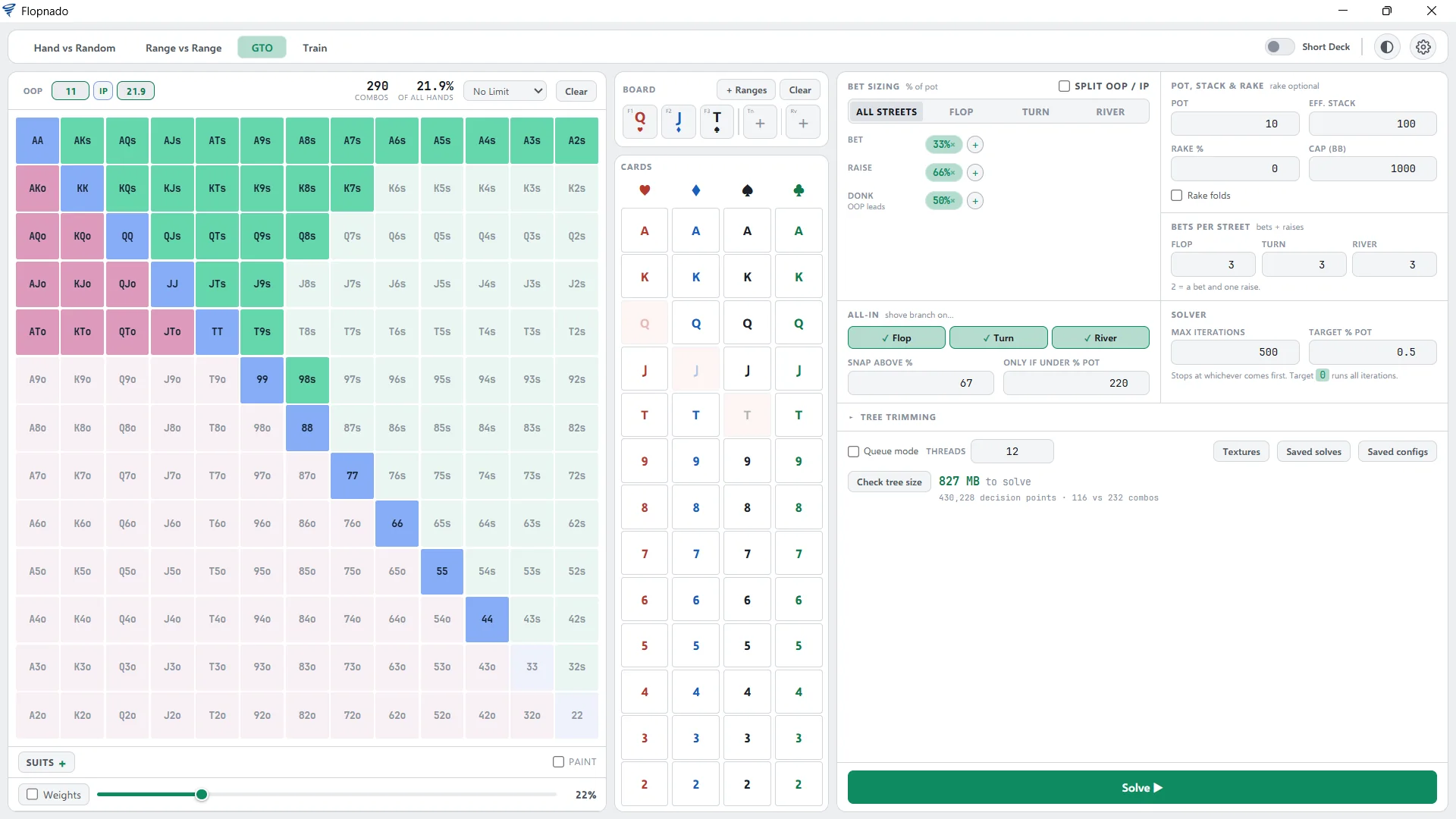
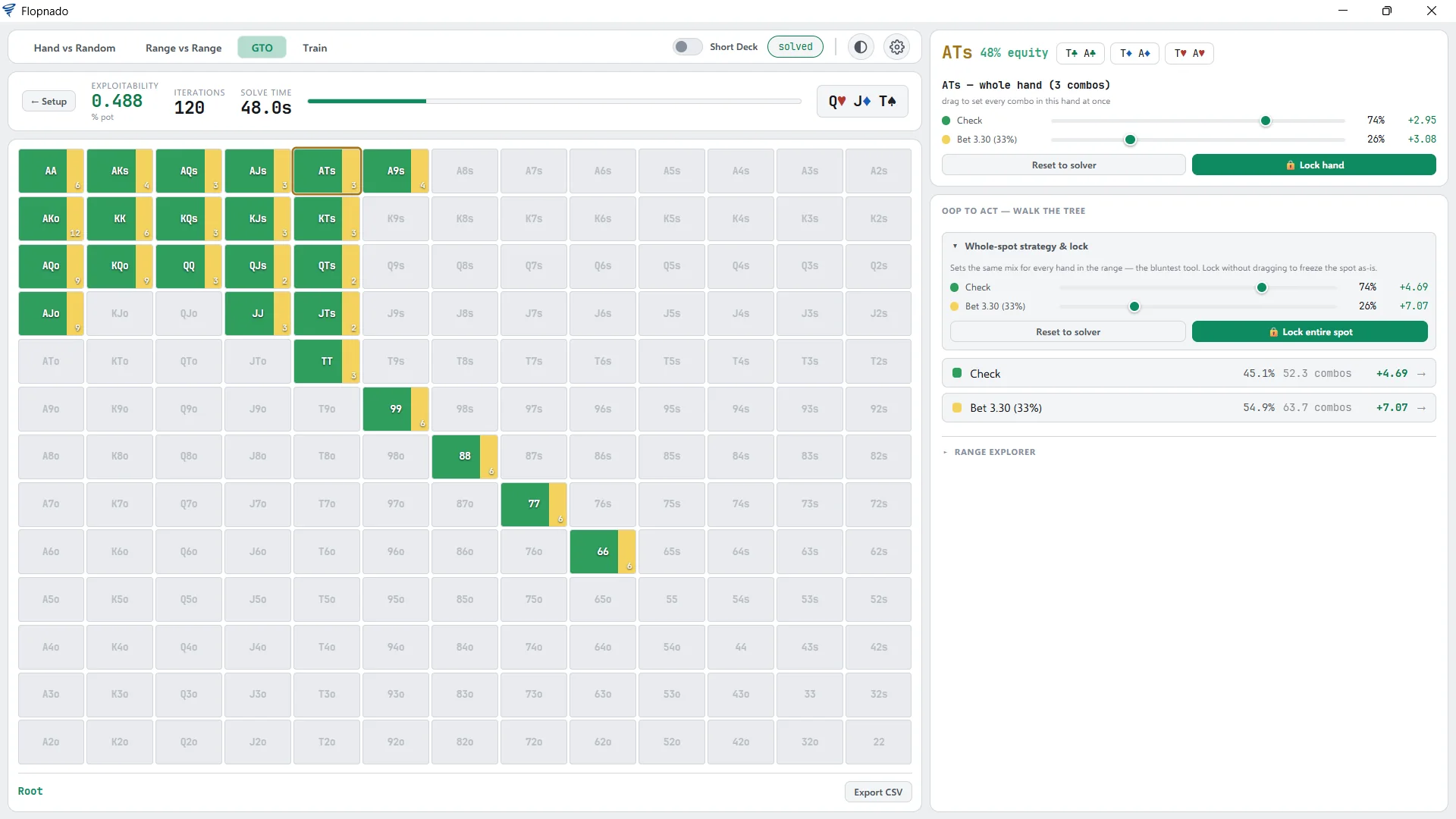
The clearest way to show what you get is to study one spot from start to finish. The example here is a flop of Q♥J♦T♠. The screenshots from it are at the end of this article.
Setting up the spot
You start by painting each player's range on the grid. You can give hands weights, for hands you only play some of the time, and use suit filters when only some combos belong in the range. Then you set the pot, the effective stack, and the rake as a percentage with its cap.
Bet, raise and donk sizes can be set once for every street, or separately for each one. You can also split them by player, if the two sides should have different options. You can cap how many bets happen on a street and decide when all-ins come into the tree. Finally you choose how accurate the solve should be, as a percentage of the pot, and the most iterations it may run. Ranges, setups and finished solves can all be saved and opened again, and results export to CSV.
Before you start, Check tree size tells you how much memory the solve will need. The Q♥J♦T♠ spot needs 827 MB. On a Mac running Flopnado, all of your memory is there for the solver, because none of it is going to Windows.
Solving and reading the strategy
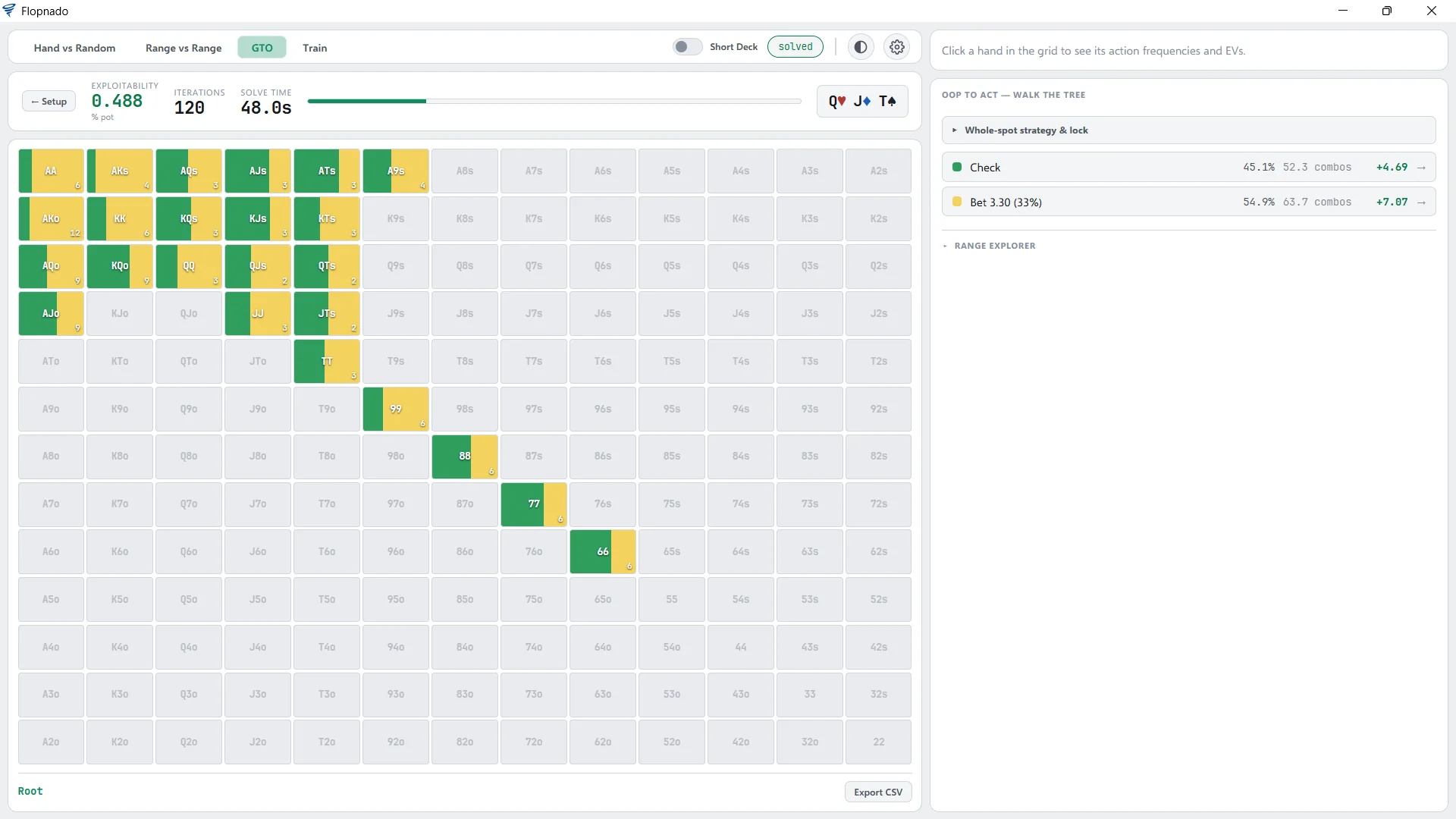
This spot solved to 0.488% of the pot in 120 iterations, in 48 seconds. That number is how far the strategy is from perfect, so lower is better. The first player checks 45.1% of the time and bets a third of the pot 54.9% of the time. Every hand in the grid shows its own mix, with the EV of each action.
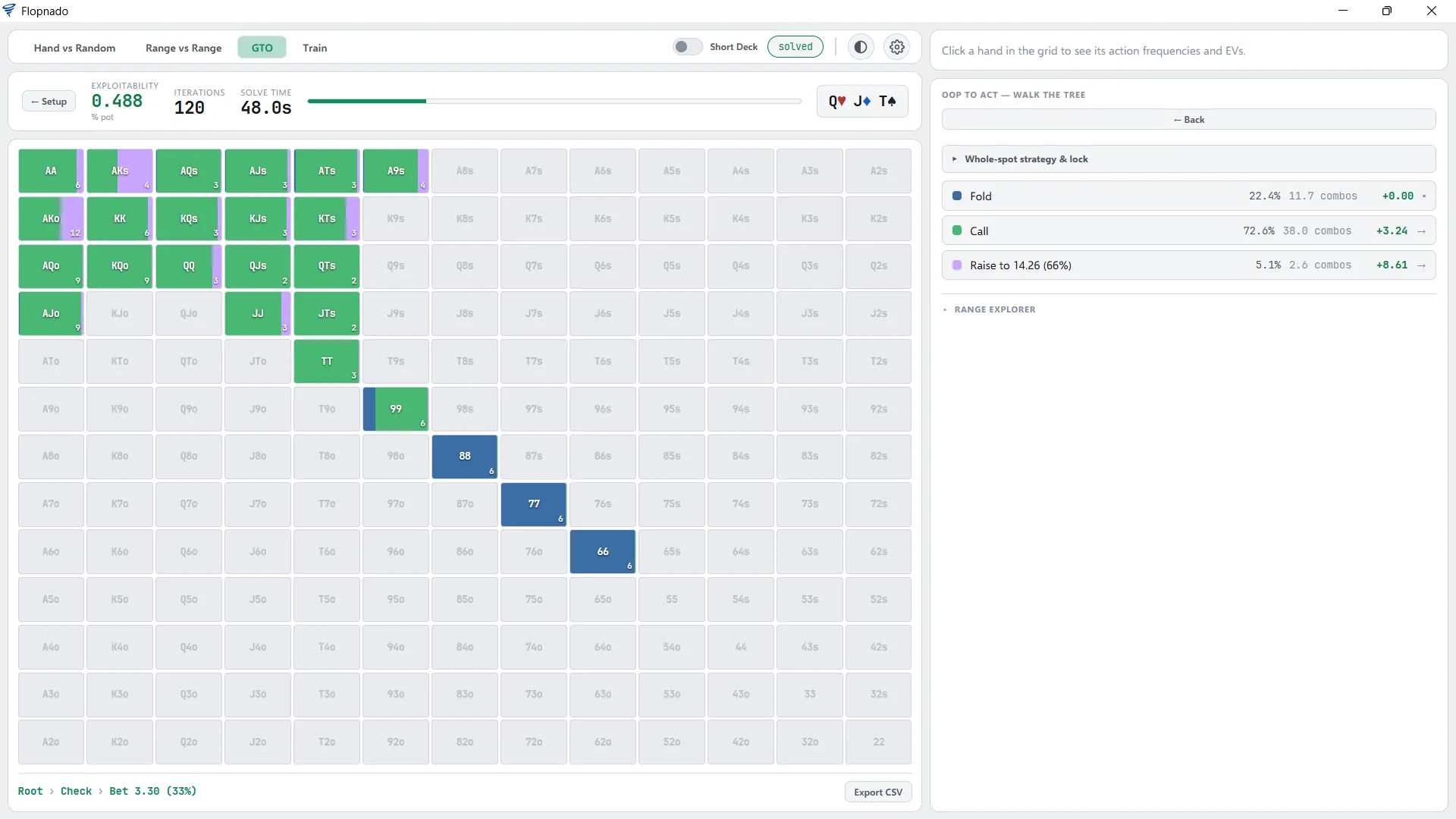
Click an action to move down the tree. After a check and a third of the pot bet, the first player folds 22.4%, calls 72.6% and raises 5.1%. The path you took shows along the bottom, so you always know where you are.
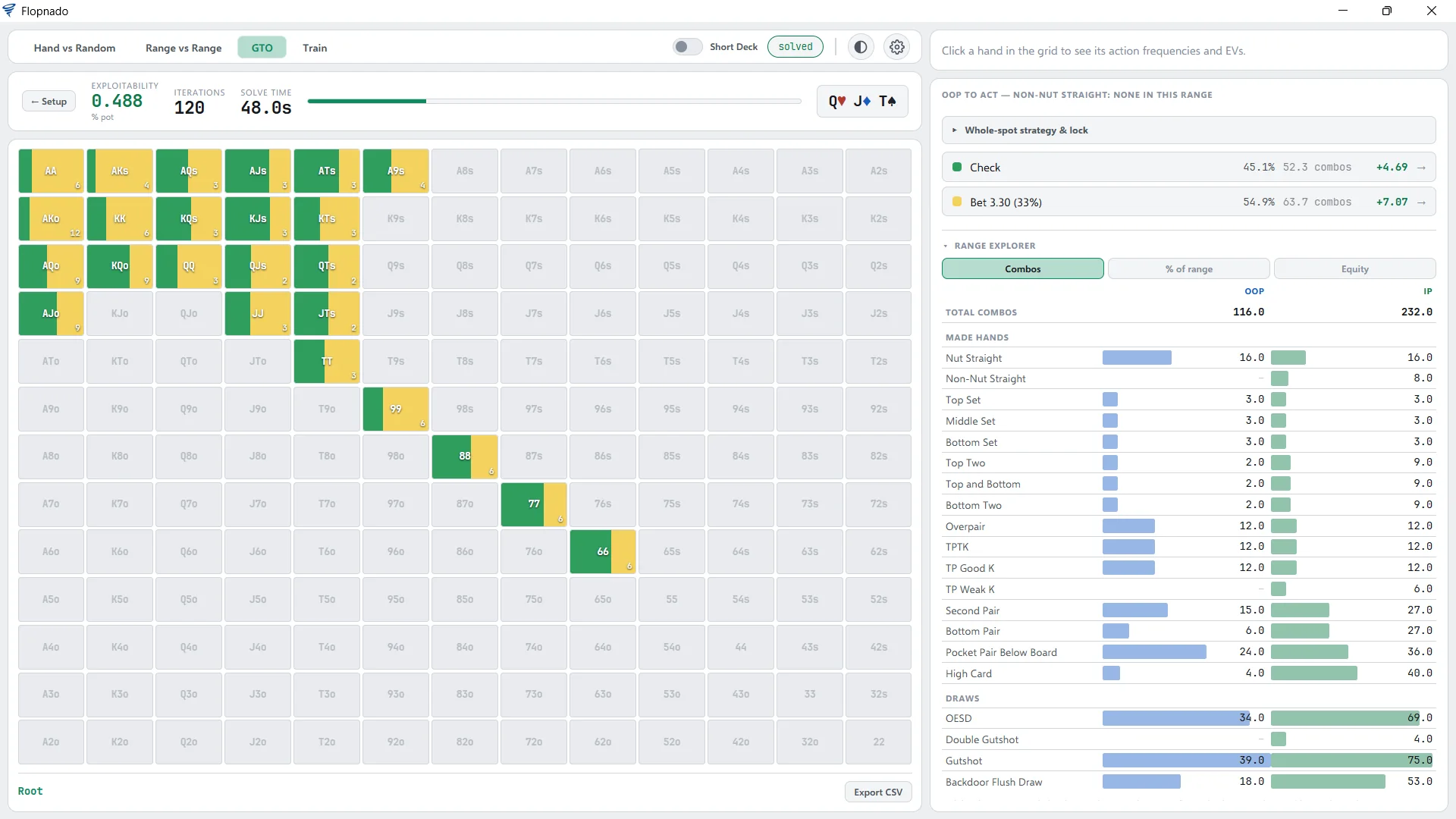
Next to the strategy is the range explorer. It splits both ranges by hand type: nut straights, sets, two pair, top pair by kicker, draws and more. You can see it as combos, as a percentage of each range, or as equity. On a board like Q♥J♦T♠, that is how you see at a glance who holds more of the straights and sets.
Solving many boards at once
One flop teaches you one flop. To learn the patterns, you need to look at lots of them, and that is what aggregate solving is for. Pick a group of similar boards, for example every two-tone flop, and Flopnado solves them all and shows you the average strategy across them. On GTO Wizard, custom aggregated reports need the Elite plan and credits. In Flopnado, they are part of the same €20.
You can also queue boards and let them solve in the background while you study something else. Each solve saves at a few hundred KB to a few MB, so a big library of your own spots won't fill your drive.
Node locking
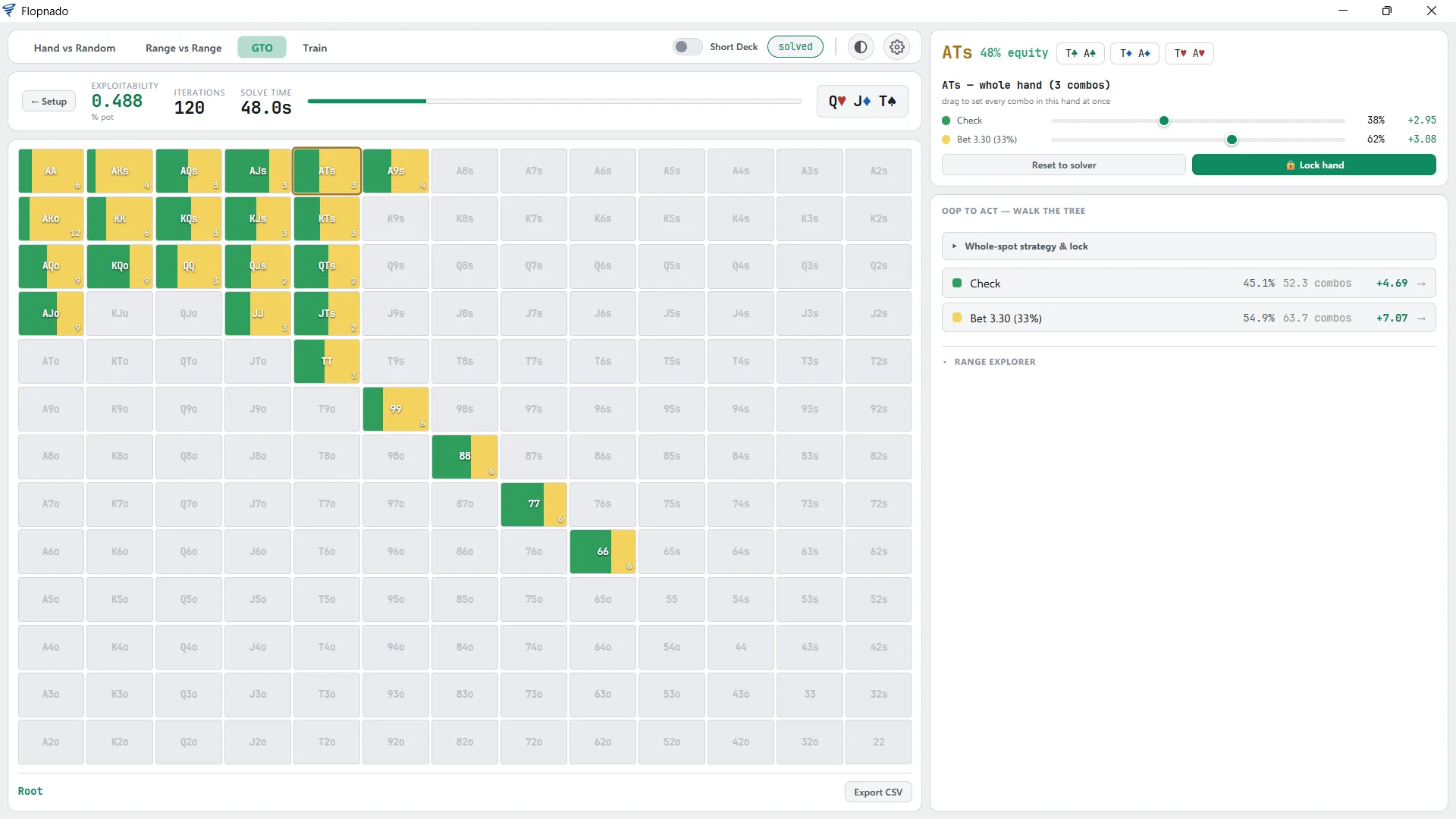
A solver assumes both players play perfectly. Your opponents don't, and node locking is how you find out what to do about it. Click a hand, drag the sliders to set how it plays, and lock it. In the example, ATs is locked to check 38% and bet 62%. Then you solve again and see how the other player's strategy changes.
If you want to change a whole range rather than one hand, Whole-spot strategy & lock sets the same mix for every hand at once. Lock without dragging anything, and the spot is frozen as it is.
Every turn card at once
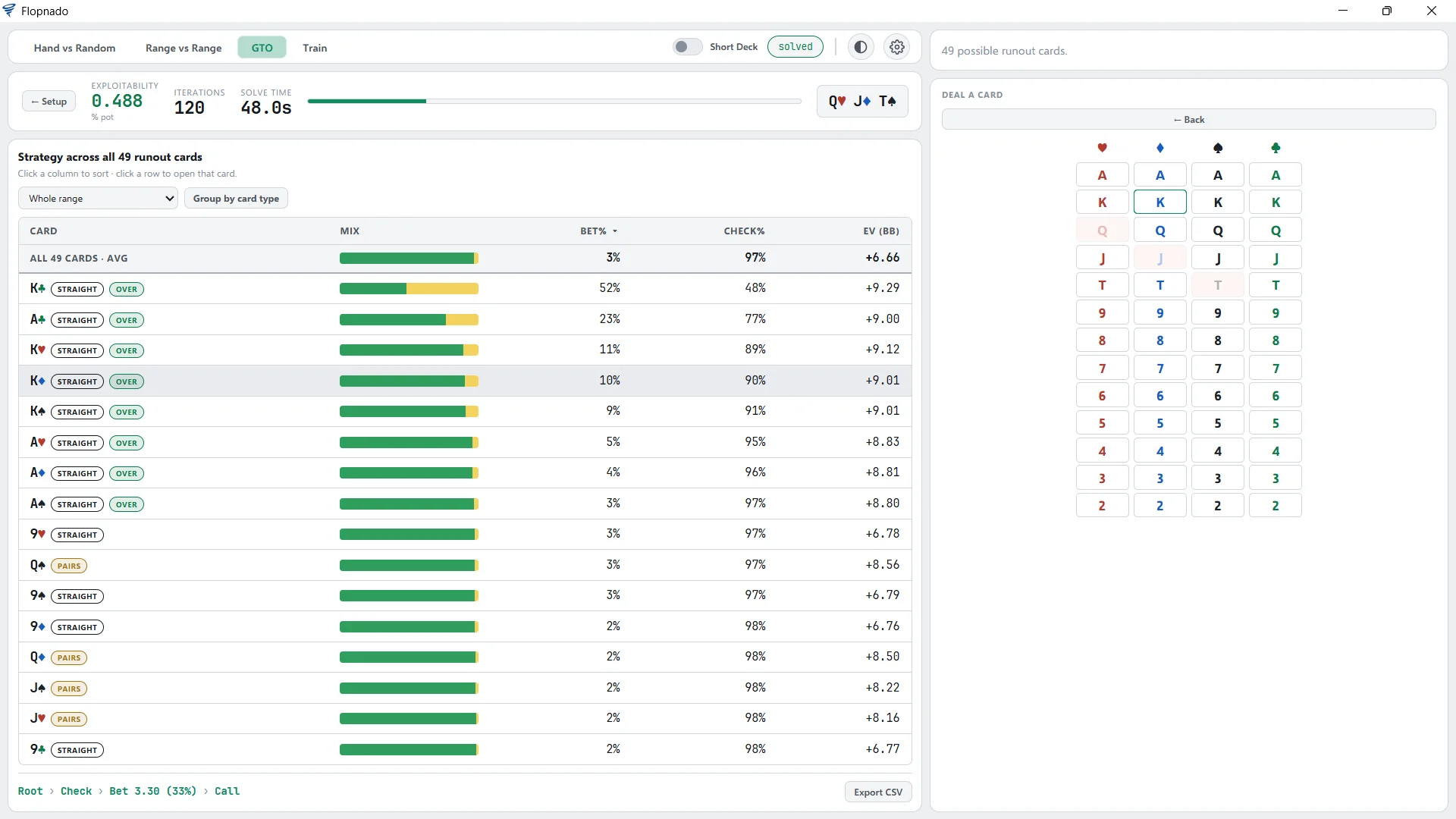
Once the flop is played out, you'll want to know what happens on the turn. Instead of clicking through 49 turn cards one at a time, Flopnado puts them all in one table. Each card shows how often it gets bet and checked, and its EV. Each one is also tagged by what it does to the board, such as completing a straight, being an overcard, or pairing the board.
You can sort any column, group the cards by type, and click a card to open the spot on that turn. In the example, the K♣ gets bet 52% of the time, while most turns are almost always checked. That stands out straight away in a table, and is easy to miss going one card at a time.
Training on your own solves
Knowing a strategy and playing it are not the same thing. The trainer deals you hands from your own saved solves, so you practise the spots you actually care about. You pick an action. It then shows you what the solver does, and how much your choice cost, in big blinds and as a percentage of the pot.
My mistakes replays the hands you got wrong. You can play out of position, in position, or both. You can focus on one street, and skip hands where there is no real mistake to make. You can also show the villain's range, split into the hands he kept and the hands he folded.
Short deck
Flip one switch and the solver plays short deck, and so does every calculator. Both rule sets are covered: the one where a straight beats trips, and the one where trips beat a straight, as used on iPoker.
The HUD and calculators in the same app
The solver isn't the only thing in the download. The same app has a HUD with 36 stats, for 9 poker sites and up to 4 tables, on Windows and Mac. It is free forever, and every stat is explained on the stats page. It also has all the equity calculators: Hand vs Random, Hand vs Range, Range vs Range with multiway up to 9 players, and board analysis. The solver and calculators lock while a real-money table is open, to stay inside the poker sites' rules. None of the other solvers in this article come with a HUD or calculators.
Questions people ask
Does PioSolver work on M1, M2 or M3 Macs?
Yes, but not on its own. PioSolver is a Windows program, and Macs with an Apple chip (M1 and later) can't use Boot Camp. So you run Windows inside macOS with Parallels and install PioSolver there. That means paying for Parallels and a Windows licence on top of the solver, and giving part of your memory to Windows.
Do I need Parallels to run a solver on a Mac?
Only for the Windows solvers: PioSolver, GTO+ and Simple Postflop. Flopnado runs natively on Apple chip and Intel Macs, so it needs no Parallels and no Windows. MonkerSolver, TexasSolver and GTO Gecko also run on a Mac, and GTO Wizard runs in the browser.
How much memory do I need for a solver?
PioSolver's own figures are about 4 GB for the simplest flop trees, 6 GB for a typical one and 12 GB or more for huge trees. When the solver runs inside Windows on a Mac, Windows takes its own share first. Flopnado uses less memory than other solvers: on the same spot, it needed about half what PioSolver did. Check tree size tells you how much memory a solve needs before you start it.
Is there a free GTO solver for Mac?
TexasSolver is free and runs on a Mac, but in my own testing it handles suit isomorphism wrongly, so some of its results are wrong. Desktop Postflop is free too, but it was suspended in 2023 and has to be built from its code on a Mac. Flopnado starts with a 48-hour free trial of the solver and everything else, and its HUD stays free forever.
What's the cheapest solver that runs on a Mac?
Leaving out the free ones, Flopnado is the cheapest solver here that runs on the Mac itself and is paid for once. It is €20 for the whole app, with the solver, the trainer and every calculator included.
See it in action
Here is the Q♥J♦T♠ spot from above, one screen at a time. Click any screen to see it full size.