Flopzilla and Equilab don't run on a Mac. Neither one has ever had a Mac version. To use them, you need Windows running inside your Mac, or a workaround called Wine.
They do two different jobs. Equilab tells you how often a hand or a range wins. Flopzilla tells you what a range is made of on a board: how often it has top pair, a set, a flush draw or nothing. A few tools do these jobs on a Mac. Flopnado does both of them, on the Mac itself, for €20 once. Here is every option side by side.
Every Flopzilla and Equilab alternative for Mac, compared
Where no reliable source says yes or no, the table says "Not stated".
| Tool | On a Mac | Price | Hand vs range | Range vs range | How a range hits the board | Every board at once | Narrow a range down | Multiway | Short deck | Omaha | Also included |
|---|---|---|---|---|---|---|---|---|---|---|---|
| Flopnado | Native app, Apple chip and Intel | €20 once | Yes | Yes, with weights | Yes, flop, turn and river | Every flop, turn and river | Yes (locks) | Up to 9 ranges | Yes | No | GTO solver, trainer, free HUD |
| Flopzilla / FlopzillaPro | No, Windows only | $25 once | Yes | Not stated | Yes, street by street | Flop types | Yes (filters) | Up to 14 players | Not stated | Not stated | No |
| Equilab | No, Windows only | Free | Yes | Yes | Not stated | Not stated | Not stated | Not stated | Not stated | Yes | Equity quiz |
| Power-Equilab | No, Windows only | About $3.49 a month | Yes | Yes | Not stated | Not stated | Not stated | Not stated | Not stated | Not stated | No |
| PokerCruncher Expert | Mac app | $49.99 once | Yes | Yes | Yes, flop, turn and river | Deal to flop and turn | Yes (filter range) | Up to 10 players | Not stated | Not stated | No |
| Poker Geek Odds Pro | iPad app, opens on Apple chip Macs | Free, paid extras | Yes | Not stated | Not stated | Not stated | Not stated | Not stated | Not stated | Yes | No |
| Equity Lab | Phone app, listed for Mac | $4.99, plus a subscription | Yes | Not stated | Not stated | Not stated | Not stated | Not stated | Not stated | Not stated | No |
| GTO Gecko odds calculator | In the browser | Free | Yes | Not stated | Not stated | Not stated | Not stated | Not stated | Not stated | Not stated | Paid study plans |
Running Flopzilla or Equilab on a Mac anyway
Both are Windows programs. Equilab is free, from PokerStrategy.com. Flopzilla costs $25, paid once, and the licence now includes FlopzillaPro. Flopzilla is still updated. Equilab hasn't changed in years, and its paid successor, Power-Equilab, is Windows only too.
The first way round it is the one people use for solvers. You install Parallels, put Windows inside it, and run the program there. Boot Camp used to be the other option, but it only exists on older Intel Macs. On an M1, M2, M3 or anything newer, it's Parallels or nothing. One 2+2 user put Parallels at about $10 a month, and you need a Windows licence on top. That is a lot of money and setup for a calculator that costs $25, or nothing at all.
The second way is Wine, a free tool that lets some Windows programs run on a Mac without Windows. A player on 2+2 posted how he got Flopzilla running on a Mac without Parallels. It took Homebrew, Wine, Wineskin and a session in the Terminal. For him, "it just worked". It is still a fiddly setup, and one review of these tools says Wine setups for Equilab tend to break when macOS updates.
CrossOver is a paid version of Wine, made for Macs. Its makers test programs in it, and they rate Flopzilla as "Runs Great". That rating is for Flopzilla. I couldn't find one for FlopzillaPro or Equilab.
Whichever way you go, you end up with a Windows program in a Mac window. It works for as long as the workaround keeps working.
Calculators that run on a Mac
PokerCruncher Expert
PokerCruncher is the real Mac option, and it has been around for years. The Expert version is a Mac app that costs $49.99, paid once. It does ranges for up to 10 players, and it analyses how a range hits the flop, turn and river. It can deal a range to every flop or turn, filter a range down, and draw equity graphs and a heat map of the next card. It also has 8 ways of ranking hands for building ranges.
If you want a Flopzilla-style tool that was built for the Mac, this is the one that has done it longest. It is a calculator only. There is no solver and no HUD.
iPad and phone apps on Apple chip Macs
Macs with an Apple chip can open many iPad and iPhone apps. Two poker ones are worth knowing about.
Poker Geek Odds Pro is free with paid extras. It covers Hold'em and Omaha, including 5, 6 and 7 card Omaha, with hand ranges and equity graphs. It is the strongest Mac choice for Omaha. Equity Lab costs $4.99. It does your hand against a range, on any street, and weighted ranges and saved ranges need its premium subscription.
Both are made for a touch screen first. They open on a Mac, but they are phone and iPad apps.
In the browser
Free equity calculators in the browser work on any Mac. GTO Gecko has a free odds calculator for hand vs hand and hand vs range on any street. It sits alongside their paid study plans, which start at $24.99 a month. DeucesCracked has a free hand vs range calculator that runs 10,000 random run-outs for each answer.
These are fine for a quick Equilab-style number. I couldn't find either one breaking a range down across boards, which is the Flopzilla job.
PokerStove, the original free equity calculator, was Windows only. Its website went down in 2013.
Flopnado: Flopzilla and Equilab in one Mac app
Flopnado is a poker study app for Windows and Mac. On the Mac it is a native app, made for Apple chip Macs (M1 and later) and Intel Macs. There is no Parallels, no Windows and no Wine.
It costs €20, paid once, for the whole app. €20 is the early adopter price. Every download starts with a 48-hour trial of everything. When the trial ends, the HUD and analytics stay free forever.
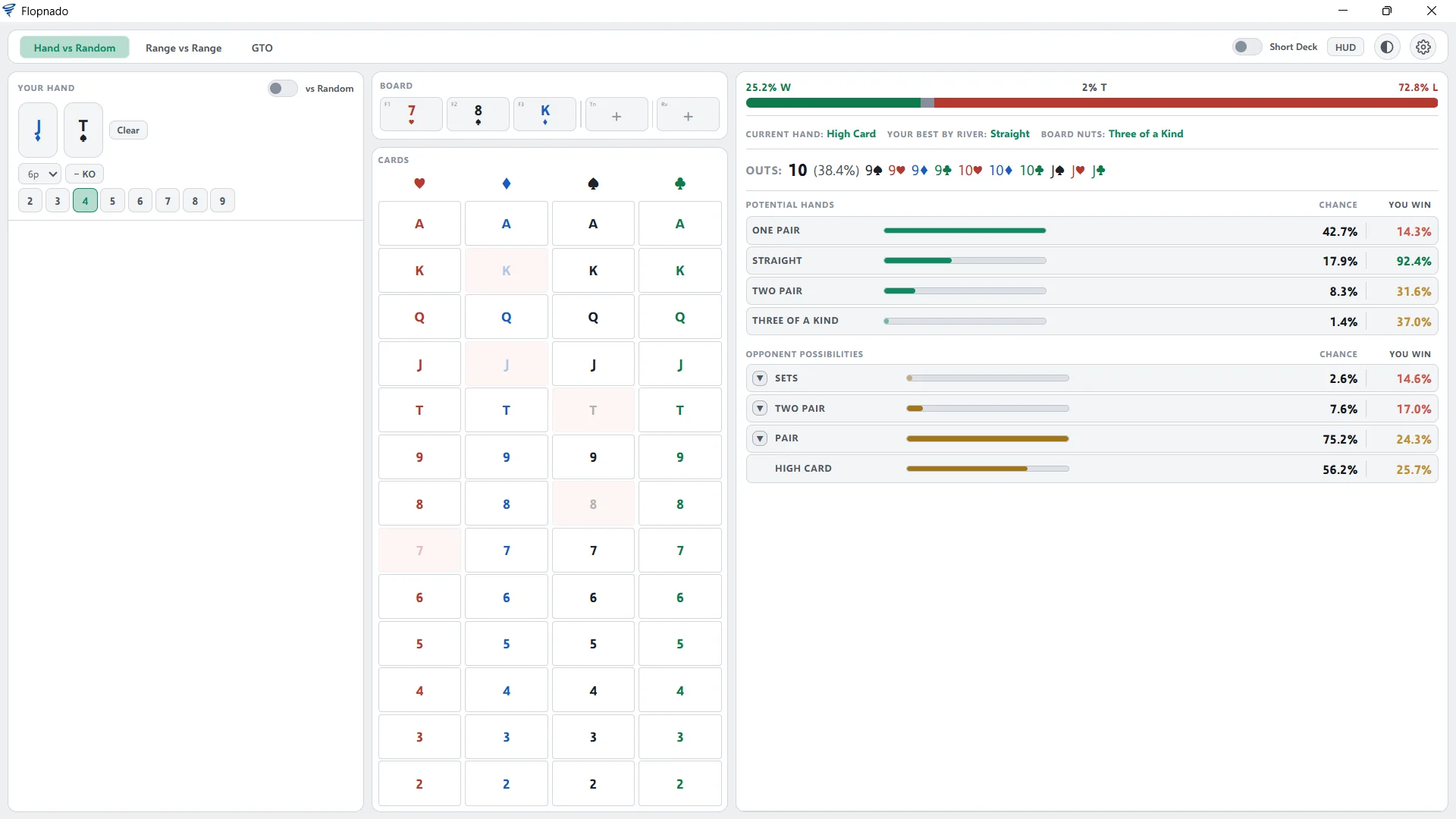
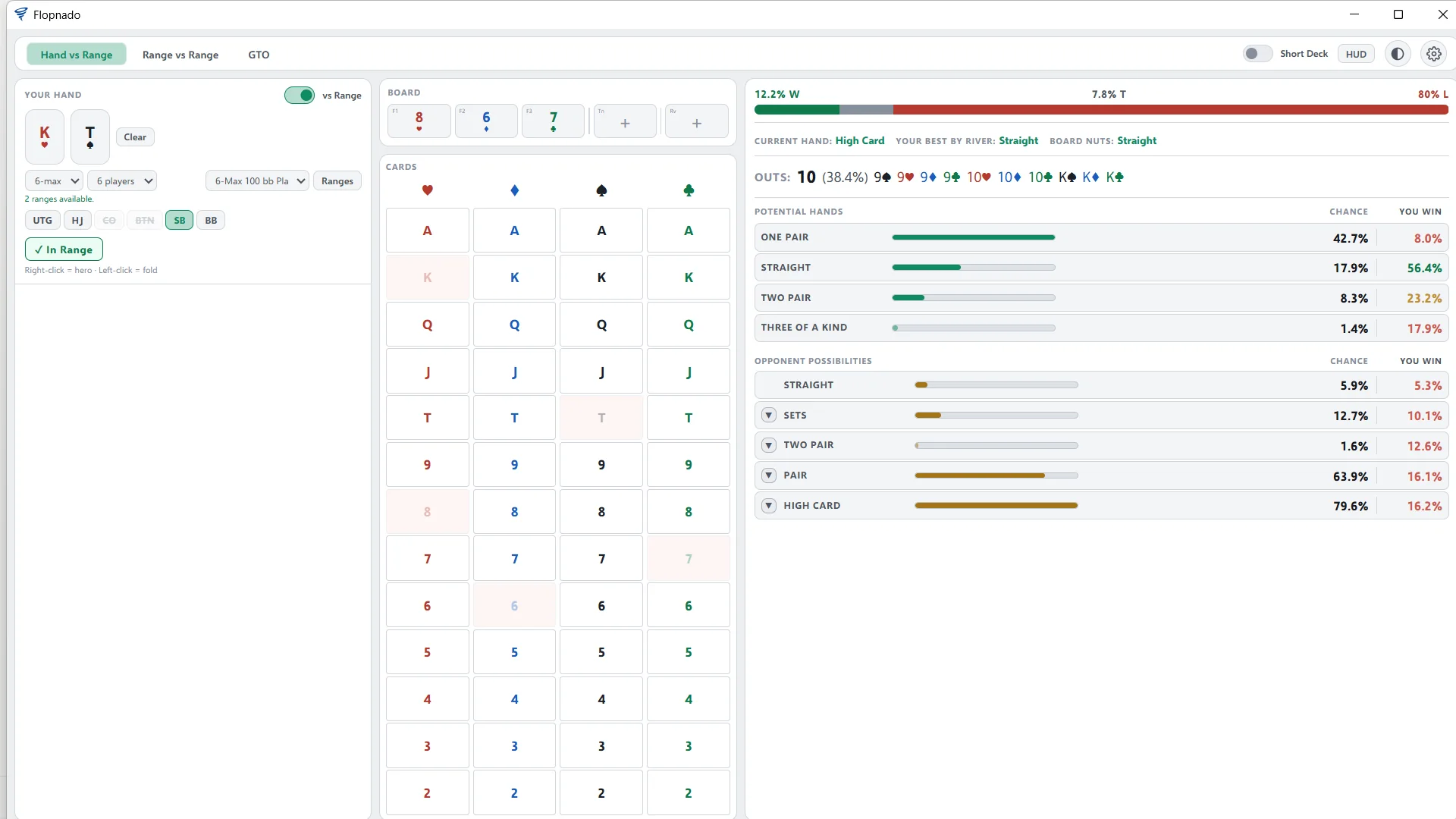
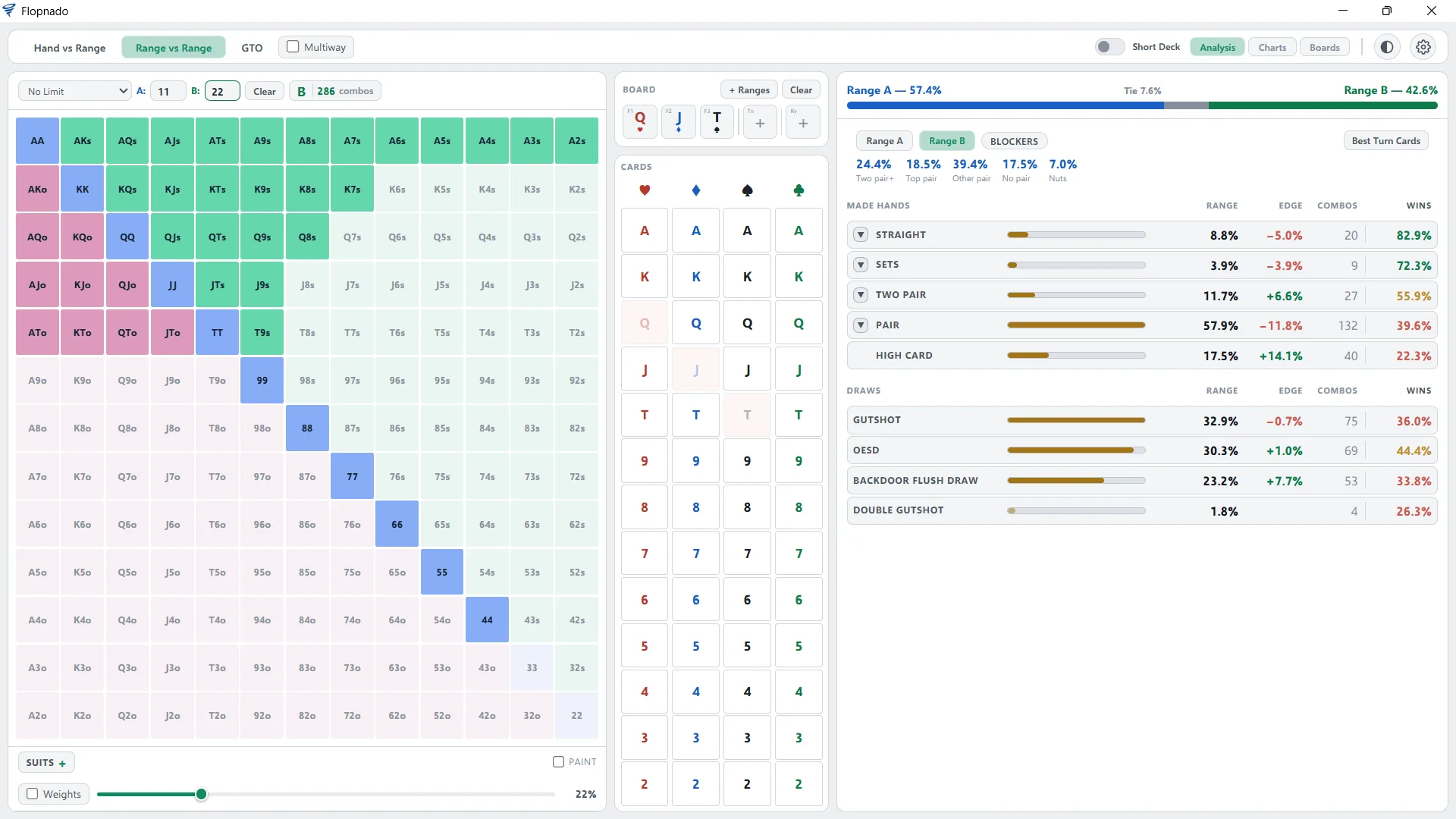
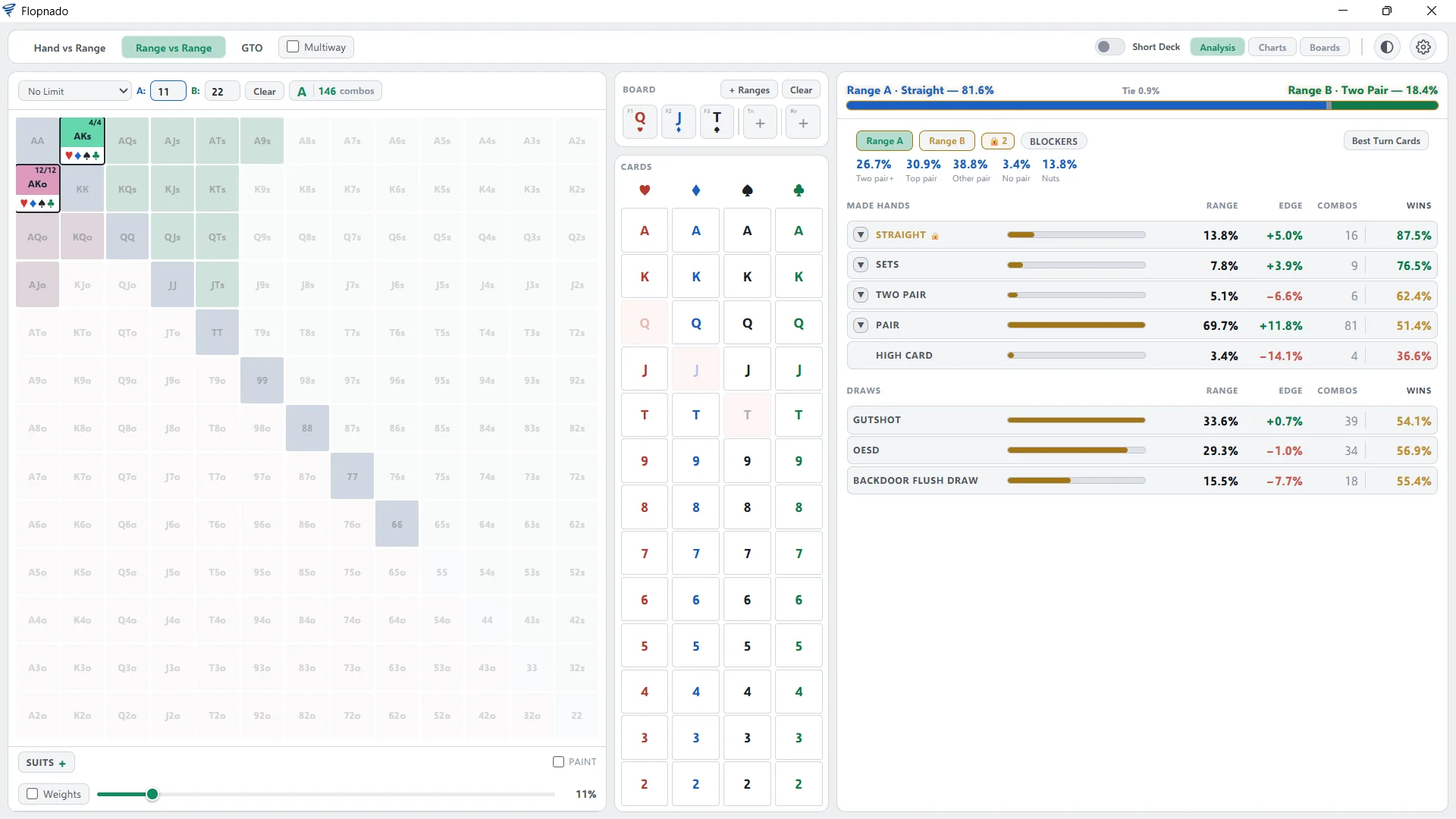
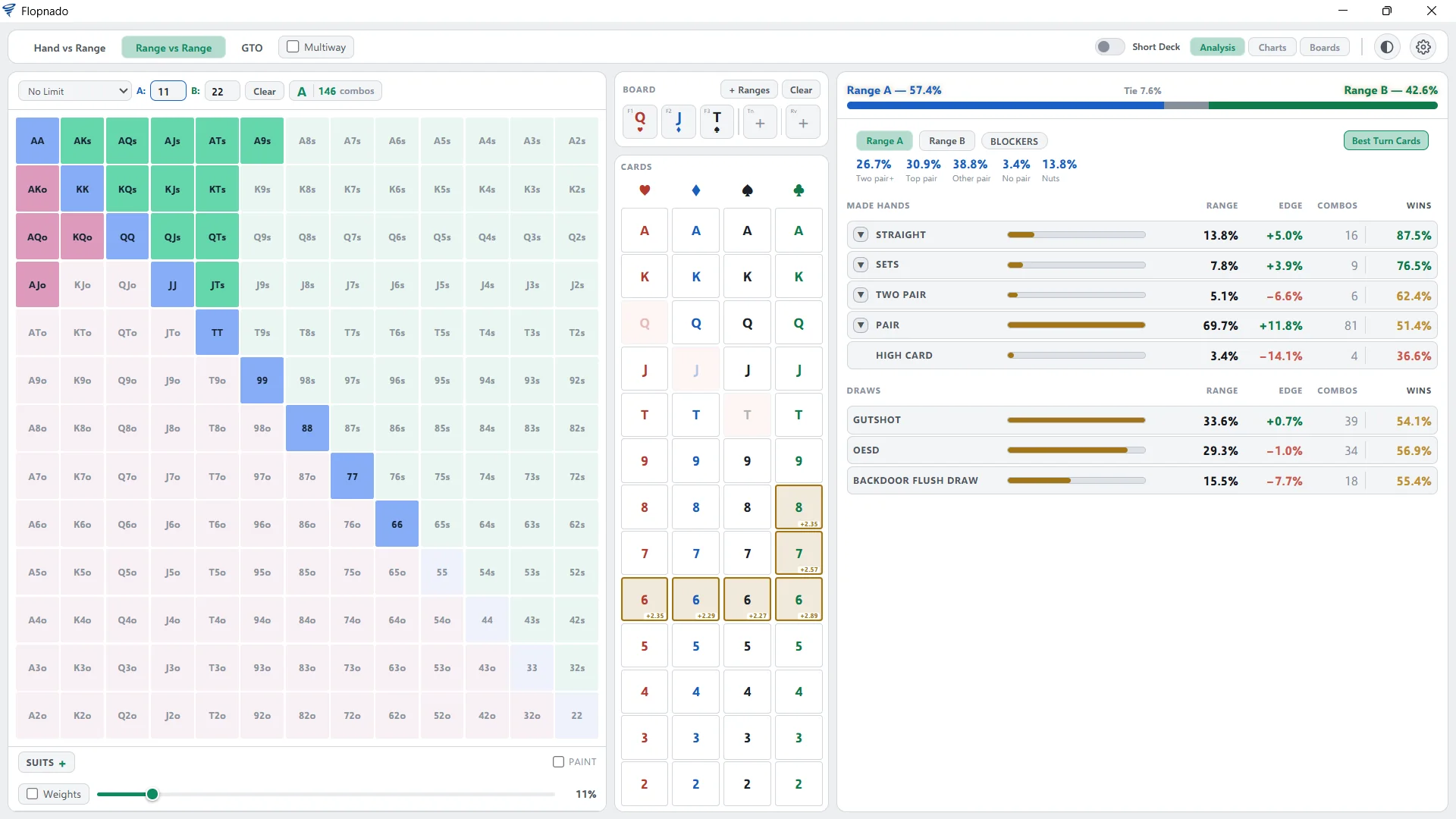
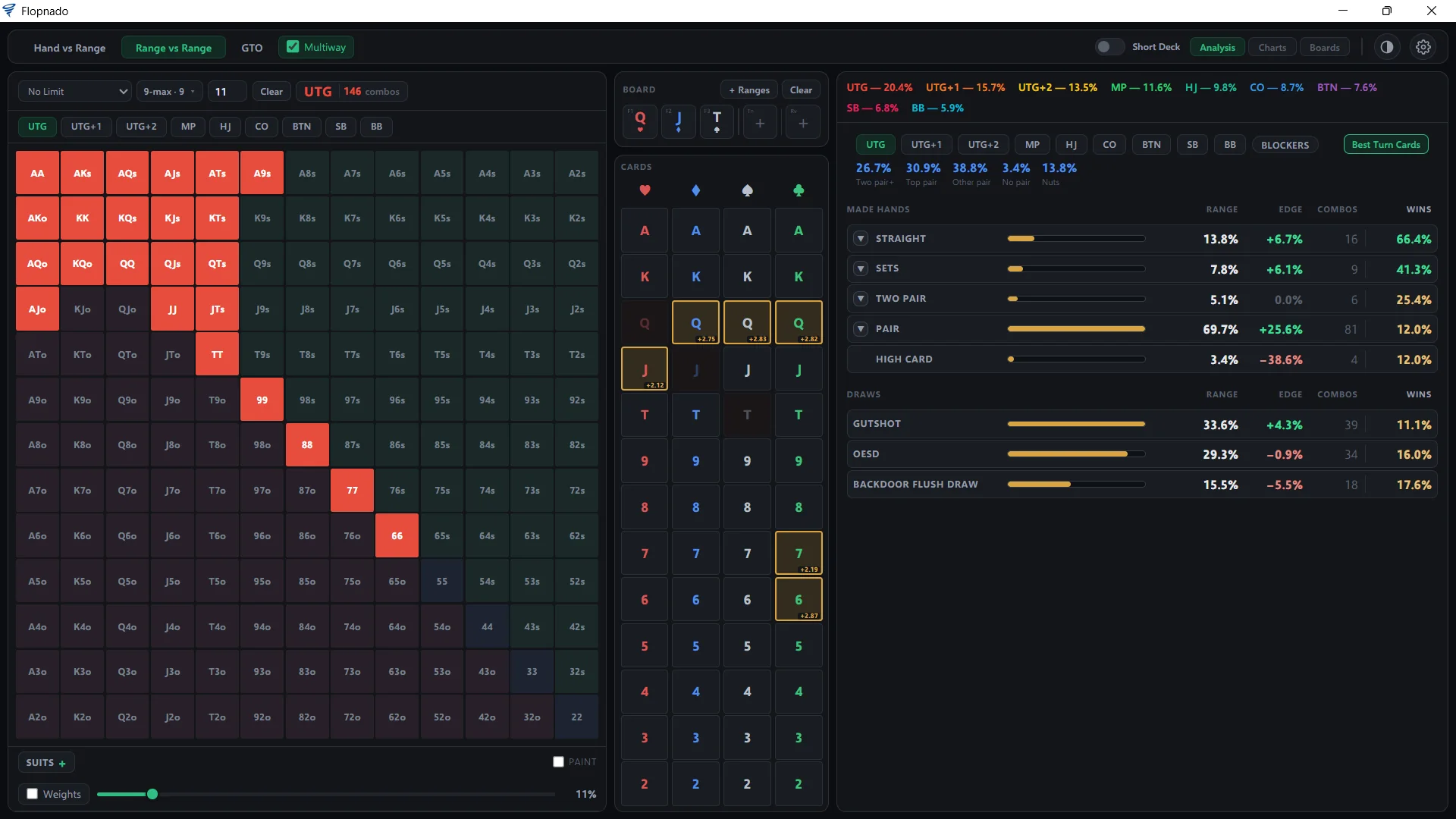
Below is what each part does, with real numbers from the app. Most of it uses one example: a tight range, the top 11% of hands, against a wider range, the top 22%. The board is Q♥J♦T♠. The screens are at the end of this section, full size if you click them.
The Equilab job: how often you win
Hand vs Random puts your hand against 1 to 8 random hands. Give it J♦T♠ on 7♥8♠K♦ against three players, and it wins 25.2% of the time. It lists your 10 outs card by card. It also shows every hand you could finish with. You make a straight by the river 17.9% of the time, and when you do, you win 92.4%.
It works the other way too. It shows what your opponents could be holding. Here, at least one of them has a pair 75.2% of the time, and a set 2.6%. When a player folds, the KO button takes them out.
Hand vs Range swaps the random hands for real ranges. You pick 6-max or 9-max and a saved range for each seat, then your own seat. It tells you whether your hand is in your seat's range, and works out your equity against what the other players actually play.
Range vs Range puts two ranges against each other. You paint them on the 13×13 grid, by top percentage or hand by hand. You can paint by suit, give hands weights, and pick from 5 ways of ranking hands. Saved ranges load with one click.
On Q♥J♦T♠, the tight range has 57.4% equity and the wider one 42.6%. Then it splits each range into what it holds. The wider range is 8.8% straights, 5 points fewer than the tight range. It has more two pair, 11.7% of the range and 6.6 points more. Every hand type shows its combos and how often it wins. There are 35 made hand types in all, from top set down to bottom pair, plus every kind of draw.
Narrowing a range down
Flopzilla's best feature is filtering: take a range, keep only the hands that would continue, and look again. In Flopnado that is a lock. Click the hand types you want, and the range is cut down to just those hands. The equity is worked out again straight away.
Lock the tight range's straights against the wider range's two pair, and it comes out 81.6% to 18.4%. You can lock more than one hand type at once, like top pair plus flush draws, on either side.
Blockers answers a different question. Hover over a hand in your range, and it shows how much of the other range your two cards take away: made hands, draws and the nuts. You can also mark hand types the other player folds, and see what is left.
Best Turn Cards marks every turn card that helps a range, and by how much. On this board, the sixes and two of the sevens help the tight range by about 2 to 3 points. Once the turn is down, the button becomes Best River Cards.
The Flopzilla job: every flop, turn and river
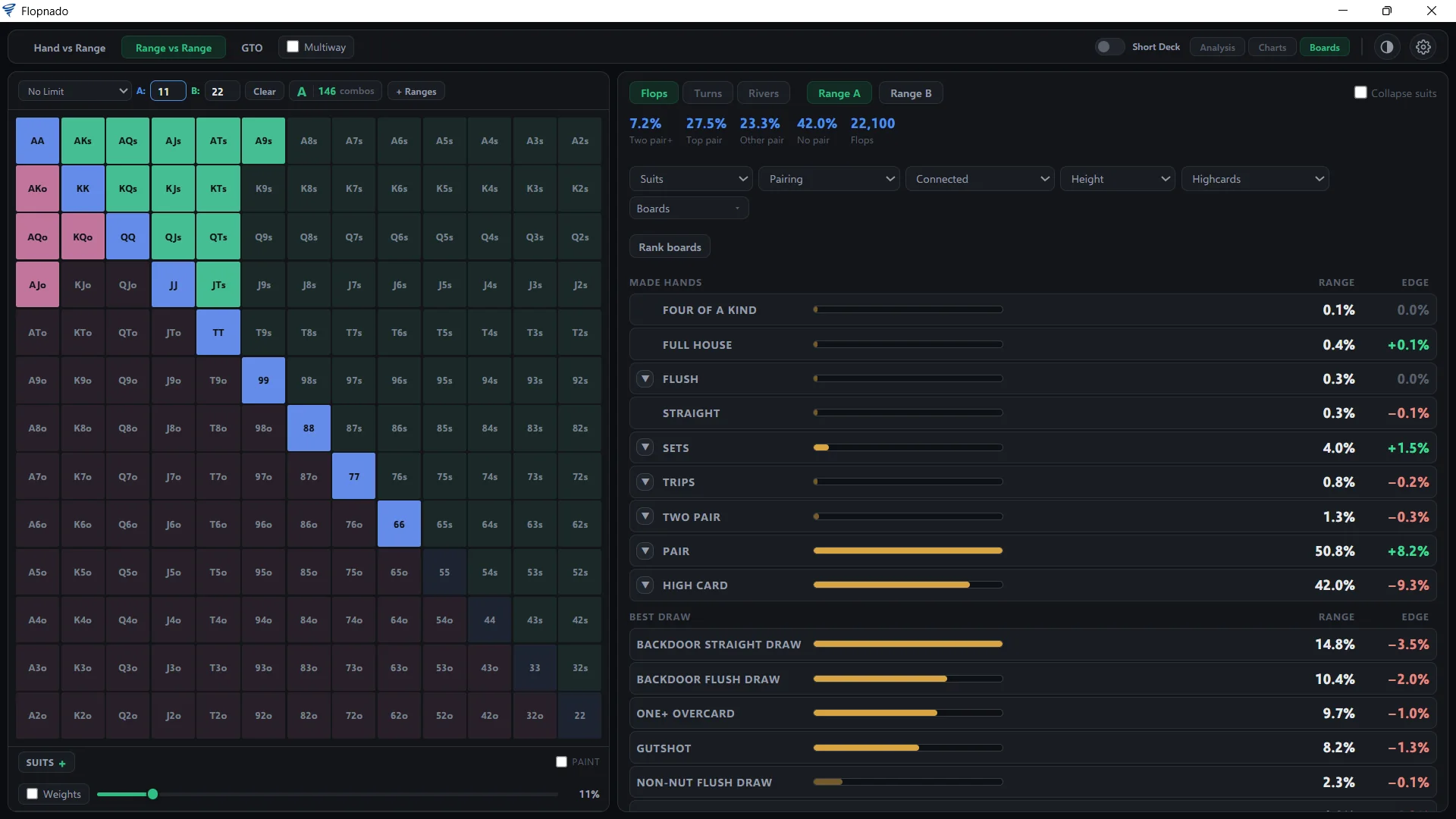
The Boards tab takes a range and runs it over every possible flop. That is all 22,100 of them. The tight range makes two pair or better on 7.2% of flops, top pair on 27.5%, another pair on 23.3%, and nothing on 42.0%. It flops a set 4.0% of the time. Each line also shows the gap to the other range.
It does the same for every turn, all 270,725 of them, and every river, all 2.6 million. Then you can filter. There are five filters: suits, pairing, how connected the board is, how high it is, and how many broadway cards it has.
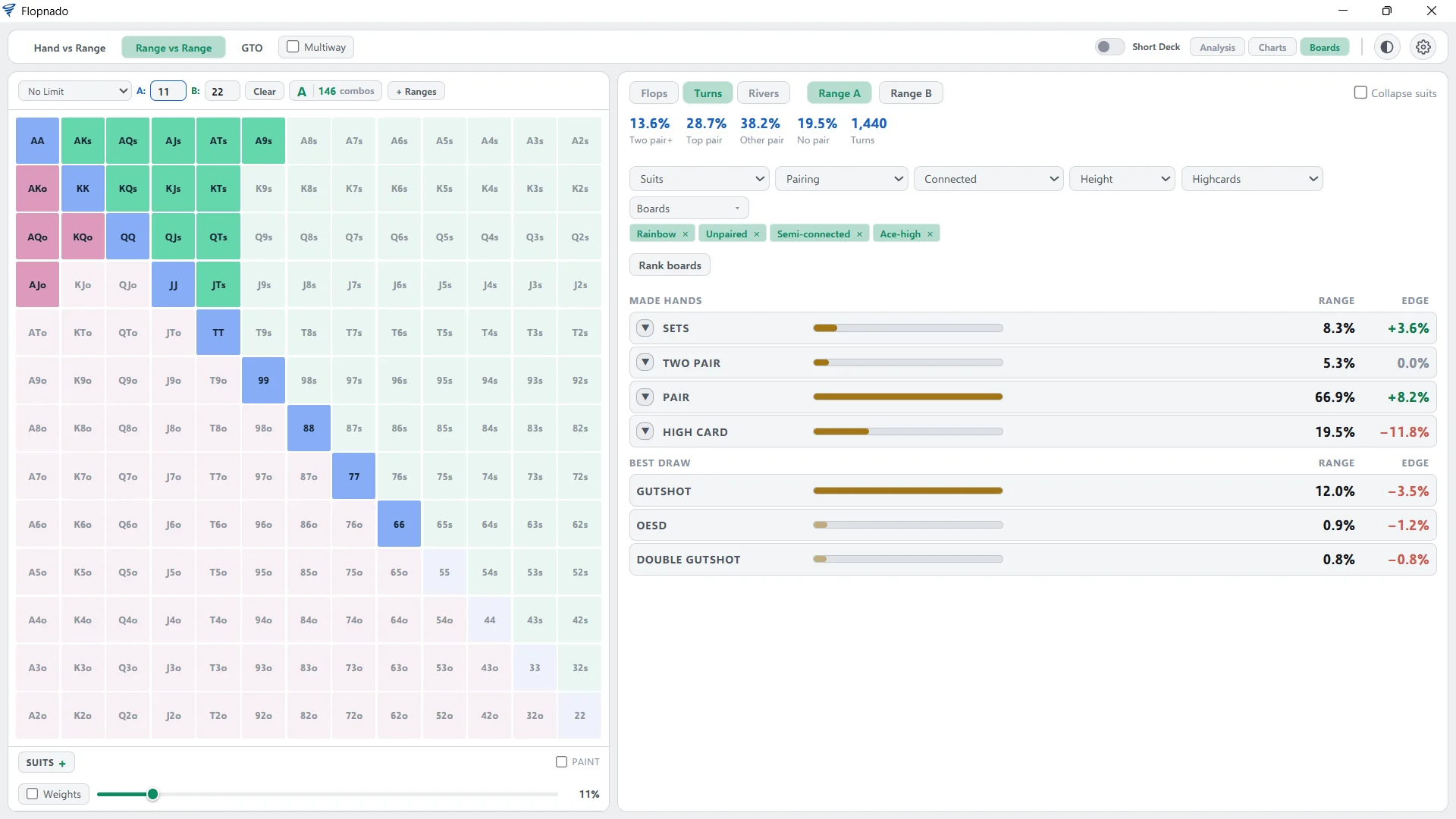
Pick rainbow, unpaired, semi-connected, ace-high turns, and you get 1,440 turns. On those, the tight range has two pair or better 13.6% of the time, top pair 28.7%, and a set 8.3%.
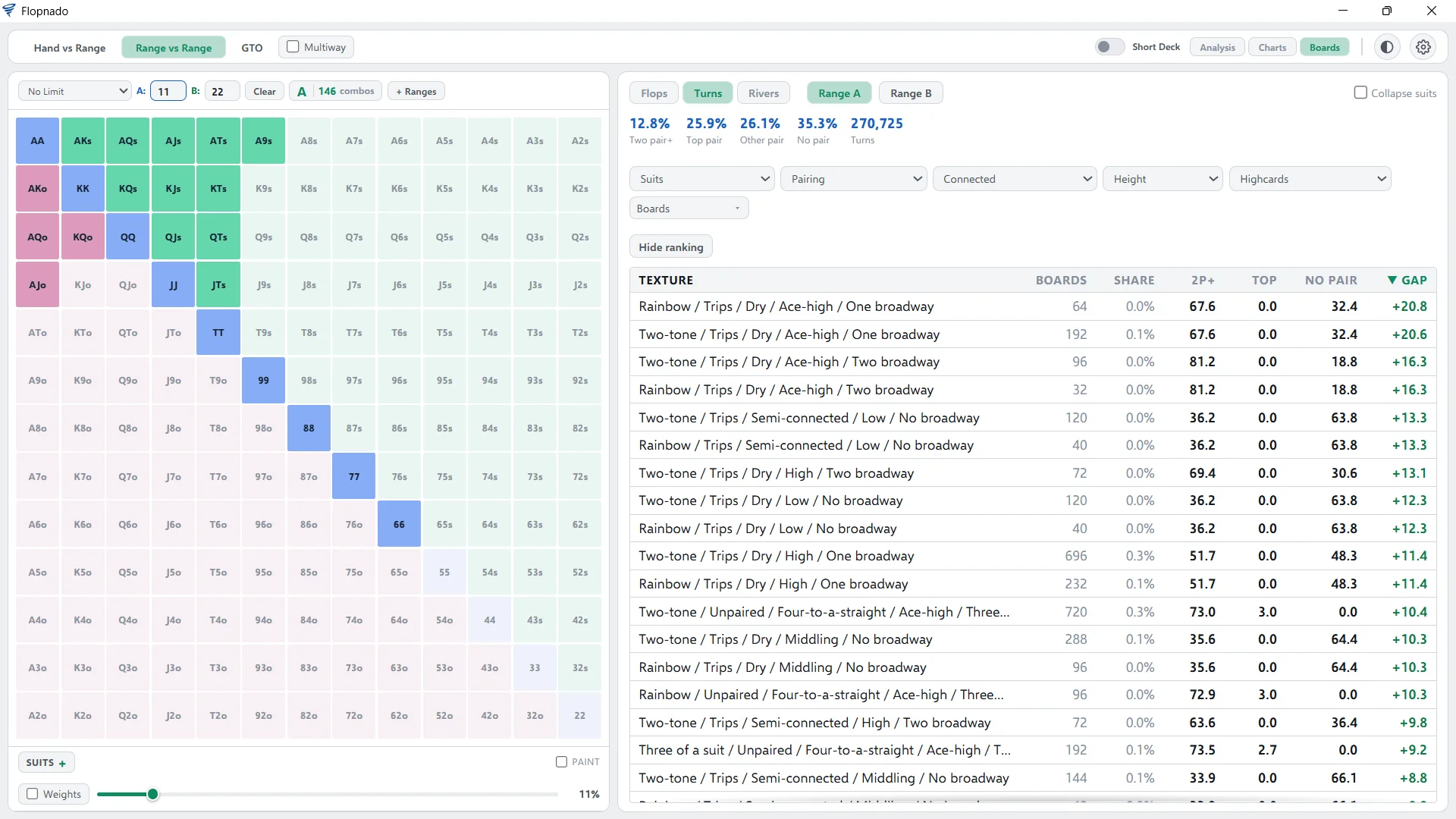
Rank boards turns it round. Instead of you picking board types, it lists every board type, best to worst, for your range. You can sort it by any column. On the turn, the top of the list is boards with trips on them. There the tight range makes two pair or better 67.6% of the time, 20.8 points more than the wider range.
Multiway, up to 9 ranges
Tick Multiway and every seat gets its own range, up to 9 of them. On Q♥J♦T♠ with nine 9-max ranges, UTG has 20.4% equity and the big blind 5.9%. Locks, blockers, Best Turn Cards, the charts and the Boards tab all work multiway. You can look at one seat at a time or one seat against the whole field.
Short deck
Flip one switch and every calculator plays short deck. That includes the Boards tab, which has its own short deck flops, turns and rivers.
What else comes in the same download
None of the other tools in this article come with anything beyond the calculator. Flopnado's €20 also covers a GTO solver that runs on your Mac. On the same spot, it gave the same strategy as PioSolver with about half the memory. The Flopnado vs PioSolver comparison has the numbers, and the GTO solver for Mac article walks through it. There is a trainer too, which deals you spots from your own solves.
And there is the HUD, with 36 stats on every opponent, for 9 poker sites and up to 4 tables. It is free forever, along with the analytics on your own game. Every stat is explained on the stats page. The calculators and the solver lock while a real-money table is open, to stay inside the poker sites' rules.
The one thing Flopnado doesn't do is Omaha. It covers No-Limit Hold'em and short deck. If you play PLO, Equilab on Windows or Poker Geek Odds Pro on a Mac are the ones to look at.
Questions people ask
Is there a Mac version of Flopzilla?
No. Flopzilla and FlopzillaPro only run on Windows. On a Mac you need Parallels with Windows inside it, or Wine, or CrossOver. CrossOver's makers rate Flopzilla as running well in their software. If you want a Mac app that does the same job, PokerCruncher Expert and Flopnado both show how a range hits the board.
Is there a Mac version of Equilab?
No. Equilab is free, but it only runs on Windows, and so does the paid Power-Equilab. The same workarounds apply: Parallels, Wine or CrossOver. Flopnado does hand vs range, range vs range and multiway equity on the Mac itself.
Is there a free equity calculator for Mac?
Yes, in the browser. GTO Gecko and DeucesCracked both have free hand vs range calculators that work on any Mac. For range vs range, board analysis and multiway, Flopnado starts with a 48-hour free trial of everything.
Does any Mac app show how a range hits the flop, like Flopzilla?
Yes. PokerCruncher Expert ($49.99) and Flopnado (€20) both do. Flopnado also runs a range over every turn and every river, filters the boards by type, and ranks every board type for your range.
Does Flopnado do Omaha?
No. Flopnado's calculators and solver cover No-Limit Hold'em and short deck. For Omaha, Equilab does it on Windows, and Poker Geek Odds Pro does it on Apple chip Macs.